Showing posts with label softwares. Show all posts

Simple Way To Edit And Convert Your eBook To Another Format

Hey guys! Now you can edit your ebooks with this excellent open source program, which supports most major ebook formats including EPUB and MOBI. You can convert from one format to another (output formats include Amazon’s Kindle format AZW3) and edit the text of your ebooks.


eBOOK MANAGER
What you need: Windows XP. Vista. 7 or 8 


This new version adds support for third-party extensions. Calibre also has an online service that lets you access your hook collection on any web-connected computer and subscribe to online newspapers and magazines. Click ‘Download calibre’ to download the MSI installer tile, and click Advanced during setup to choose which shortcuts (which Calibre calls ‘subfeatures’) to include. 


Read More

Buy PremiumAV Antivirus 2015 For Rupee One (Cheapest Antivirus Ever)

Buy PremiumAV Antivirus 2015 for rupee one. Its for single user up-to 3year of premium protection from virus and other harmful threats. Indiatimes shopping portal giving big discount on festival season. PremiumAV Antivirus 2015 supports both 32/64 bit architecture.


Now secure your PC/Laptop with PremiumAV antivirus just for rupee one. Additional delivery charges apply. Delivery charge is Rs199, so total cost will be 200. But it still a good deal because we are getting protection of 3 year, just for Rs200.


So hurry up! Grab this awesome one rupee deal now from Indiatimes shopping portal. Click here to Buy.


Note-> Cash On Delivery is not available for this product. Check all the one rupee deals here.


Other Deals:- Godaddy Cheapest Domain Name
Read More

Should You Pay to optimize Your PC?

Most of the free suites on offer, including those we’ve recommended earlier, are cut-down editions of paid-for software. If you want additional features, you can easily upgrade to the full version, usually from within the software itself (chances are, you’ll be nagged to do so!).

Advanced SystemCare, for example, is available in paid-for Pro and Ultimate editions, and upgrading gives you lots of useful extra features, including enhanced malware protection, real-time optimization, an internet booster and smart tools for daily maintenance. In a lot of cases, however, the additional tools in the paid-for edition will be non-essential extras that might be handy to have, but which you probably won’t need or use very often.


While there are plenty of great free and fully functional programs to choose from, be careful to avoid ‘crippled’ suites that scan your system for free, present you with a list of problems, and then charge you to do anything about the results. A typical example of this kind of product is PC Pitstop’s PC Matic. You should never trust this kind of program, because there’s no way of knowing how good (or otherwise) it will be at cleaning up your PC until after you’ve handed over your cash.


Snake-oil software


Some of the cleaning tools you can download (in both paid-for and free suites) could be described as ‘snake oil’ because they make grand claims for the improvements they perform, but don’t really fix problems or make your PC run any better. Many experts put Registry cleaners and Registry defragmenters in this category. Cleaning the Registry can potentially help if it’s done as part of a full maintenance routine on a PC that hasn't had any care or attention for a long time, but it does very little on its own, and in some cases can cause problems.

Accidentally removing a single important Registry entry is far more damaging than having even hundreds of incorrect and outdated entries in the Registry, which probably won’t noticeably slow down your PC or cause problems. There’s nothing wrong with using this type of tool on the odd occasion, but it’s certainly not a magic bullet to fix all your system woes.

Similarly, defragging your hard drive is unlikely to deliver massive speed boosts. Modern drives are so fast that the difference in seeking data on an optimized or un-optimized drive will be minimal. In fact, the process can lessen the lifespan of a regular HDD if it’s over used, and should never be used at all on an SSD. You should only defrag a drive once a month, at most, using a trusted tool such as Defraggler.
Read More

IceCream Ebook Reader: Manage All Format Ebooks

If you have a collection of ebooks in a range of different formats, you can use this free program to keep them organized. IceCream Ebook Reader can handle all the most popular ebook types including EPUB. MOBI, DJVU and FB2. You can ‘star’ titles, filter them by format and delete books when you’ve finished them, and the program usefully records your reading progress so you can instantly see how far Into a book you are.

DOWNLOAD

You can also switch between full-screen and window modes, jump to the table of contents, add bookmarks, adjust the font size, and switch between light and dark reading modes, while the search tool lets you look up specific text or a page number. 
Read More

File Converter: Docu Freezer

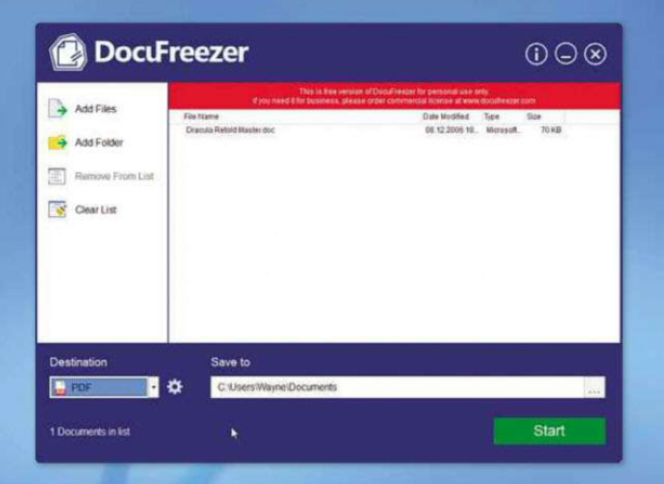
Sharing a document relies on the other person having the right program to open it, and there’s no guarantee it will look exactly as it does on your PC unless you present it as a PDF or image file. Docu Freezer solves this problem by converting any document into a range of formats including PDF, PNG, JPG and TIF.

Mm requirements: Windows XP/Vista/7/8+
File size: 7.9MB 


Just drag the document(s) to the program window (you can also drop folders containing documents), pick the format you want to convert to and click Start. Note that Docu Freezer requires you to have Office 2010 (or later) installed if you want to convert files that were created using Microsoft’s Office suite, such as Word documents. 
Read More

Download the latest software versions

Most popular free software gets updated on a regular basis. Some programs update themselves automatically, while others provide an Update button, and some require you to go to their originating websites and look for new versions yourself. 

To save yourself all this effort, install FileHippo.com Update Checker (www.filehippo.com/updatechecker). This looks for outdated software on your system and let you download the latest versions.

You could also try Secunia PSI (secunia.com), which scans your PC to find programs that need updating. You can either set Secunia to work automatically, or run the software manually.


Read More
Previous PostOlder Posts Home