Showing posts with label social network. Show all posts

Why Google+ is Better for Getting High SERP than Facebook and Twitter

If you are a blogger then you must heard that Google plus is better than Facebook, twitter and other social media platforms. But do you know Why Google+ is Better for Getting High SERP than Facebook and Twitter? In this post I will let you know about importance of Google+ in blogging and internet marketing.

When Google+ was launched then most of the people didn't know its importance and power regarding SEO, targeting audience and building a spam free social network.

No doubt, Facebook has vast network but now a days its being spam by spammers. We can see many spammed post in groups, pages and even on timelines. There are also rapid decline in Facebook users after the launch of whatsapp because people are being more and more mobile.


Google+ gives you the power of building your own circle in which you can add people related to your industry. We can use hashtags to reach more audience and people love to share quality content on Google+.

In terms of Search Engine Optimization (SEO), Google give more preference to the link that shared on Google+. As we all know that social signals are very important to rank a particular link in Google search. But if we talk about Facebook new policy update then they are restricting the post reach in various manners. 

Although, Twitter is something advanced but you can only post up-to 60 characters in a tweet. Also there are nothing like groups or circle. You should have good number of followers to get traffic but it won't help you much in getting ranking in Google SERP.

So its a good idea to pay attention on Google+. Make room in your SEO strategy for Google+ and spend time there. There is not doubt that Google+ play important role in order to get rank in Google SERP. 

How To Make Better Google+ Profile For SEO 

1- Build up your Google+ profile with real personal information.

2- Always use your own picture for profile pic.

3- Show your past achievement on your cover page.

4- Write a good bio.

5- Post quality stuffs with proper hashtags.

6- Do comment and give +1 to post related to your niche. 

7- Create a circle and add all your industry people in that. 

8- Post quality stuffs regularly.

How Google+ Helps To Get More Targeted Audience 

We can get more GEO targeted traffic from Google+ with the help of circle. Create Google+ circle and add people to specific circle and share related content with all your circles. Let takes a example, if you have written a article about Google+ then you should share that with your social media circle rather than designing circle. 

For Getting rank in Google SERP, there are more than 200 factors but it is experienced by many of us that post shared on Google+ ranked quick and better than Facebook and Twitter. Thats all for Why Google+ is Better for Getting High SERP than Facebook and Twitter.
Read More

Trick To Create Account On Ello | Get Invitation Code For Ello

Ello is advertisement free Social Media which is made by advertisers who put forth their hands to start advertisement free network named as Ello by the few Of "Advertisers". In short time Ello is getting popularity and also called as "Killer of Facebook". Even though it’s in beta mode there are huge Thoughts and idea which has put forth by the developers. Every user data is recorded to provide the better features and every link is carefully tracked.

Advertisers are providing Ello as Advertisement free social network even the advertisers decided to contact and join reach content connected users in Ello so that they can get profit throw that this way user can be himself Advertisers and Publisher of Himself As a first day in join this new network Ello. It is hard to Join Ello, but every user are in Ello are allowed to Send Invitations to join 5 of their friends and they can sign up there and their accounts will be quick and active on the mark .But Even though Ello Allowed to enter their email to get invitations there is long queue for new members. But even though Ello made a link to invite lot of members there you can directly request to sign up without waiting for invitation but many of them disappointed for making users wait for invitations.


Watch the below video about how to create account on Ello.


Facebook user’s better stay on Facebook until beta comes. You can easily signup and Ello to try New Environment you can have chat in Facebook with your friends in meanwhile you can’t have much fun over there without chat with friends but still you are allowed to post it out there with info and about you can post your comments check out Ello users. 


If you compare Ello with Facebook, it is Facebok Killer. There are only options which are matching like user profile with info and the wall where you can use  your profile picture and you can can’t see preview of image while you are uploading, that’s not cool but looking good.

Every new user can feel Twitter in Ello Beta mode  we can’t even expect much more because Ello is still In Testing stage but Ello is loading much faster we hope site will be completed much soon as possible because there are lot of missing features as below: 


User blocking
Inappropriate content flagging
Audio integration (Soundcloud)
Private Accounts
Rich (multimedia) commenting
Mobile web refinements
Repost w/ author attribution
Notification Center
Online/offline user designation
Love + Love bookmarking stream
Emoji index
Video integration (Youtube, Vimeo, Instagram & Vine)
@@ Private Messaging

Auto-push posts to other networks iOS & Android mobile apps. Soon as possible lot of people in out there need not wait, you can Google it or YouTube it for keys that you need to join Ello.

Ello collects information related to your visit to the site, This information helps ello to understand how far people are using Ello, so that they can make Ello better and also The information that Ello collects includes your location, languages ,referring web site,time spent visiting Ello too. After a research and internal debate, Eloo decided to use a special anonym zed version of Google Analytics to collect visitor data. If that is something you are uncomfortable with output.

Ello says “If you choose to use a Chrome web browser, an Android Smartphone, or if you have recently used services like Google Search or YouTube, your web browser or device may be sending data back to Google that Ello can't control.”
Read More

Why Orkut Has Been Closed | Google First Social Network Closed

I had started my Social media journey by Orkut in 2010 but Google announced that Orkut will be closing on 30 September 2014. Orkut was a place where we can meet old and new friends, relatives, colleagues etc..  It was lucky for me because I met my Girlfriend from Orkut. Hahaha... :) Now we apart from last 2 years but Orkut had always been a great place for building relationships.

Unfortunately, On 30 June 2014, Google announced that Orkut will be no longer available after 30 September 2014. Do you know Orkut was most visited website in Brazil and India in year 2008. It was fully managed by in Brazil by Google Brazil. Google decided to manage Orkut by Google Brazil because of large number of Brazilian user.


Why Google Announced To Close Its First Social Network 


Orkut will be no longer available after 30 September 2014 because of two legal reasons:


In India, It was the year 2006 when Bombay high court served a notice to Google for allowing a community to run hate campaign against India. The community was named as “We hate India” and it was removed due to the mass protest by Indian users.


In Brazil, It was the same year when a federal judge of Brazil ordered Google to release the list of about twenty four Brazilian nationals, believed to using Orkut to sell drugs and also involved in child pornography. Court ordered Google to pay 23,000$ per day in fine until they submit all the necessary information asked by authorities. Google announced later that information will not be release because all the information are saved in US Google Servers, not in Google Brazil server. Google further stated that because information is not saved in Brazil, therefore it’s not subject to Brazilian Laws.
Google announced that user can export their photos until 30 September 2014 and profile, scarps & community posts can be exported until September 2016.

We think that Google+ is much better place than Orkut because of its advance features. But we would love to know what you think about final closer of Orkut. Comment below and say your views. 

Thanks!


Read More

Woo my friend: Application That Connect Singles On Facebook For Dating

There are several Dating websites as popular business on Internet but I came across another one on Facebook as “Woo my friend” applicaton. Woo my friend is an application that connects singles for dating. Woo my friend App uses facebook search mechanism to find and set up a date for singles.


How Woo my friend app works:


This application automatically fetch user information and fills up a requisite form.


This is followed by a request to invite friends.


There is an application’s dashboard that keep track of activities and from whom people want to connect with.


Search tab in find  section of application let singles find their right match.


What I think about woo my friend app?


Woo my friend is quite simple to use and using a dating app on social platform seem to be a great idea.  It already has over 24,000 users and is still growing. I think its good time to switch from finding friends to finding “someone special” on Facebook! J
Read More

Simple Trick of Facebook Photos Verification: Alternative Method Of Facebook Photo Verification

Facebook photo verification trick is most asked question in Facebook groups and my followers also requested me to write a post on "how to open blocked Facebook account" because they have failed to identify friends' photos.

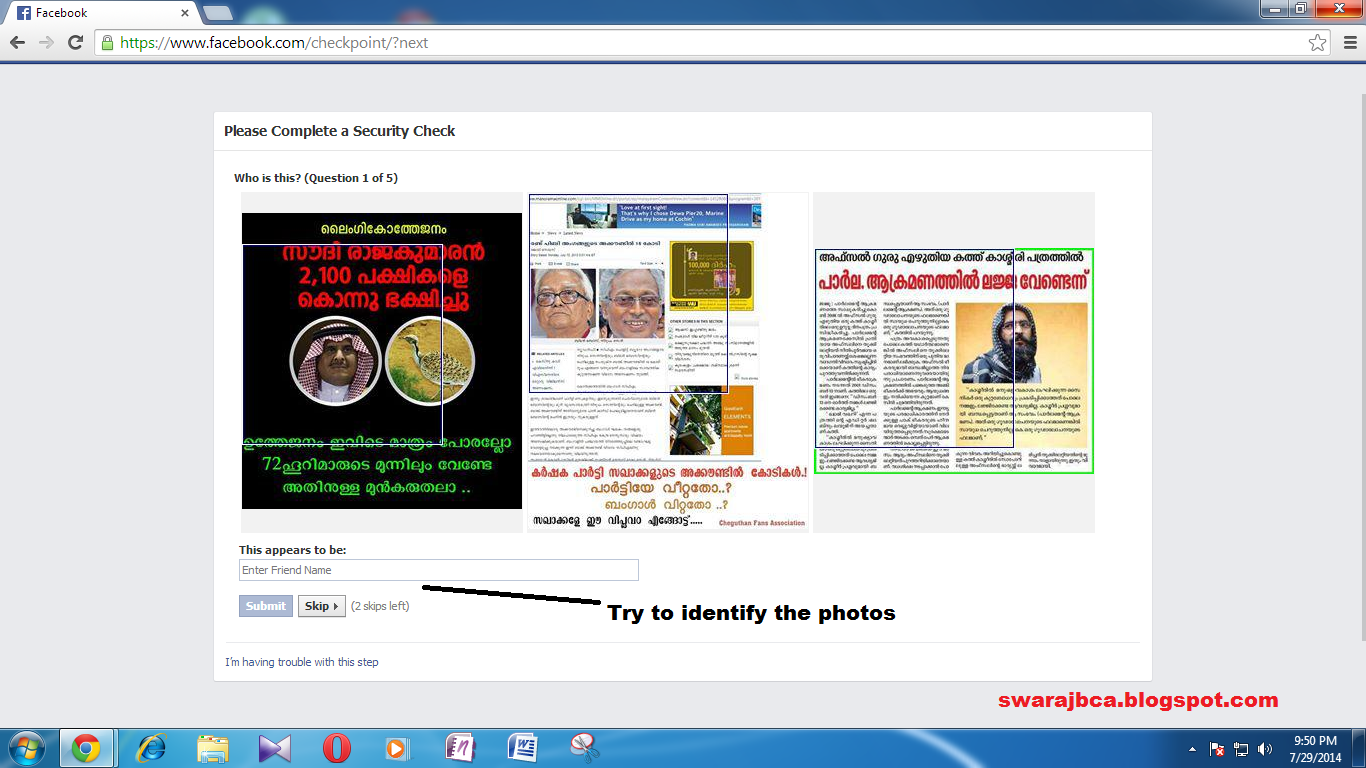
Facebook is working hard to make sure that everyone is using their real identity but sometimes we stuck in it. Facebook ask us to identify photos of 5 friends but most of time verification photos are not real, it is tagged photos. So we couldn't identify and we got blocked.


Few month ago, my Facebook account was suspended and asked me to verify my friends photos. But actually I was unable to because most of photos were tagged. What now? 


Facebook provide another way to confirm your identity by uploading a valid scanned ID. Below are the steps I used to verify my Facebook account:

1. Login to your Facebook account.

2. It will show that you may be using another person identity and ask you to verify your real identity. Click on Continue.


how to verify photos verification of facebook, fb photos verification trick


3.  Write CAPTCHA letters and click on continue.


4. Click on Start.


5. Identify the photos of friends and name it and click on Submit. If you don't know photos then click on skip. You may skip 2 times.


6. If you have identified all the 5 photos, Facebook will welcome you back.

7. But if you failed in Facebook photo verification, click on I'm having trouble with this method.


8. Click on Submit a Request.


9. Fill your name same as Facebook ID.


10. Choose scanned ID to upload.

11. Enter Country name in which ID were issued.

12. Click on Send.

Now you have to wait for confirmation from Facebook team. If you have real ID and all your information is correct, your suspended Facebook id will be open. It may take 5-10 days to get your account back.

Facebook photo verification post was requested by most of people. So, here I'm with "How to verify photos on facebook to get my account back". If it helps you, Click Like below. Thanks. 


Read More

Simple Way to Post on Twitter and Facebook Simultaneously

If you’d like all your tweets to appear on Facebook, it’s very easy to pair your accounts. On Twitter, go to Settings and then Profile. Click the ‘Connect to Facebook’ button and you’ll see a message about Twitter using some of your Facebook account information. If you’re happy with that, click OK. and when you’re told that ‘Twitter would like to post to Facebook for you’, click Okay. If successful, the page will read ‘Your account is connected to Facebook’.

facebook tricks, twitter tricks


Click ‘Disconnect it’ at any time to unpair your accounts, or simply untick post to my Facebook profile’ if you want to temporarily disable the feature. If you'd rather have your Facebook status updates posted to Twitter, go to Facebook.com/twitter and click ‘Link my profile to Twitter’, then ‘Authorize app’. You can choose which type of updates are shared, so if you only want to share Status Updates, untick all the other boxes and click Save Changes. Only public Facebook statuses will appear on Twitter, so remember to choose this option when posting, or change your privacy settings for all future posts. 
Read More

4 Reasons To Stay Away From Auto Likes

I was shocked when I got 73 search result on ebay about twitter followers. Yes, there are lots of deals available like twitter followers, retweets,  facebook likes, etc. But why peoples are running behind these craps!

twitter followers


Why You Should Not Use Tricks Like ‘AUTO LIKES’


You are fooling yourself

If you are using auto likes to increase the number of likes and think that you are getting more attention by other peoples then simply you are fooling yourself, pity on you.

Do you think you get real likes from people through auto likes?

If you are using auto likes, let me tell you that these likes are not true, these are unrealistic. Although you get more likes but these auto likes are generated by softwares, apps, websites. So, no real person is hitting Like button of your fan page, subscribing you or liking your status and photos.

Fake likes will be diminish after some time

I visited a facebook page that was getting so much likes per second but after sometimes all the fake likes diminished and only real likes were left.

Auto likes and things like these are not safe! You can be harmed or even banned

Auto likes provider can use your account to advertize for themselves, they sends private messages or a link on your friend’s timeline without letting you know about it. Facebook is really strict about activity like these and banned the suspicious accounts permanently.

So, these are the reasons to not use auto likes or any other trick like this. I strongly suggest you not to use it, otherwise sooner or later your account will be banned and you’ll cry for a week.


Subscribe Us For More. Happy Surfing.
Read More

Choose What Stories You See On Facebook

Facebook uses a ‘clever’ algorithm to determine what stories you see in your news feed. In theory, this means you should only see the updates that matter most to you, but in reality it means we simply aren't shown stories we might have liked. You can ensure you see content from your closest friends by interacting with their updates - liking the things they post and so on. This tells Facebook you want to see more like this. You can also go to www.facebook. com/[username]/friends and choose whose content you want to see. Click the Friends button next to a name and select ‘Close Friends’ to add them to that list. View the Close Friends feed at any time by clicking the drop-down News Feed menu on the Home page.
Read More

Log Into Multiple Facebook Accounts

Facebook doesn’t let you log in to more than one account at a time. You can get around this by using Chrome’s user profile feature. Click the menu button and go to Settings. Under Users, click the ‘Add new user’ button. Choose a profile picture, name the user, and then click Create to open a new window. You can quickly switch between user accounts by clicking the profile in the corner of the browser. Sign into Facebook as one user, switch profiles and then sign in as a different user.

Another option is to use an add-on such as MultiLogin for Chrome (bit.ly/multilogin340) or MultiFox for Firefox (bit.ly/multifox340), both of which let you sign into several accounts with the same site simultaneously, not just Facebook.


Read More

Write Single Name On Facebook Profile

Some celebrities are so famous they only need one name - think Madonna, Bono, Sting, Prince, Morrissey and, of course, Lulu. If you have an unusual first name or a one-word nickname, you might want to use it on Facebook. There’s just one problem – the social network insists on displaying both your first and last names. However, you can just have one name showing by pretending to be from Indonesia, where it’s common for people to go by a single name. You can do this by signing up using a proxy server that lets you pretend to be in Indonesia. You’ll find an extensive list of these at Free Proxy Lists (www.freeproxylists.net/id.html), but make sure you choose one of the servers that will keep you anonymous.


Go by a single name on Facebook


Log into Facebook and then pick an Indonesian proxy from Free Proxy Lists. In Chrome, go to Settings and click ‘Show advanced settings’. Under Network, click the ‘Change proxy settings’ button.The Internet Properties window will open. Click the ‘LAN settings’ button.

Tick ‘Use a proxy server for your LAN’. Enter the Indonesian proxy IP in the Address box and add the port number. Make sure ‘Bypass proxy server for local addresses’ is ticked and then click OK, and OK again. Switch to Facebook. You can check the proxy is working by adding a location to a post.

Open Facebook settings, change the language to Bahasa Indonesia’ and click Save Changes. Click ‘Sunting’ (edit) next to your ‘Nama’ and remove the surname. You can add an alternative name. Save the change, entering your password in the box. Finally, revert back to English and remove the proxy. 

Done. Comment below for any help.
Read More

Find Out When Someone ‘Unfriends’ You On Facebook

One of Facebook’s minor but irritating rules is that it won’t tell you when you lose a friend, let alone who it is. This is probably to avoid the upset and recriminations caused by people falling out, but it’s still useful to know who has ‘unfriended’ you, so you can woo them back. The best solution to this problem is to install the FB Purity extension (www.fbpurity.com) for Firefox, Chrome, Safari, Opera and Maxthon. 


This offers lots of customisation features, as well as telling you when you’ve been unfriended - just make sure you have the Deleted Friend Alerts option selected. If you don’t need all those extra tools (and there are a lot!), there’s a new Chrome extension called Unfriend Notify for Facebook (bit.ly/unfriend340), which simply adds a Lost Friends section to your Friends page, listing the defectors. 
Read More

How To Exceed Twitter’s 140-Character Limit

It can be difficult to squeeze everything you want to say into a 140-character tweet, and breaking a comment over several tweets often looks odd.


One solution to this is to use a tweet- extending service, of which our favorite is Long-Tweets (long-tweets .com). Sign into the site using your Twitter account; compose your tweet, using as many characters as you want, and click ‘tweeeeeeeeeeeet’ to post it to Twitter as an image. This means your followers can read the whole thing without leaving the site.

You can even give the tweet a title and insert hash tags. Other good options for composing long tweets include Tall Tweets (talltweets.com) and Twit Longer (www.twitlonger.com).


Read More

Use HootSuite to Social-Network Your Site More Easily

Social networking can attract new visitors and encourage return visits. HootSuite helps you by submitting posts to any or all the networks at once. Log In to the site at hootsuite.com and connect your services. You can’t add Pages from Facebook/Google+ without the associated personal profile, though you can remove it later.

To post a message in more than one social network at a time, go to ‘Click to select a social network' and add any sites you want to from the list below. If you manage a lot, you can pin them or mark them as favorites. Type the text into Compose message. Paste links into Add a link and click Send Now.

Successful posts can be all about timing. If you tend to do your social networking in spurts, try automatically spreading your posts through the day. Click the Scheduling icon and choose a date and time to send the post. To spread out a lot of posts, consider using Auto Schedule.


Read More
Previous PostOlder Posts Home